Inspect it
Visit the Live AppVisit the GitHub Repo
Description
The problem: Most retail stock tools either bury people in noise or hide the math behind a paywall and a black-box "AI signal." I wanted the opposite: a tool where the metrics are computed from real price data, the AI explains tradeoffs instead of giving buy/sell calls, and the same analysis can still run offline with no API keys.
The build: The core decision was to put every calculation in one shared core/ package. The FastAPI backend imports it for the deployed React app, and the Streamlit offline mode imports it for local analysis. The AI chat lives only in the backend, and it gets grounded in the current metrics rather than touching the calculations itself.
What you can verify: The deployed app pulls live quotes and price history, computes risk metrics and technical indicators, renders candlestick charts, exports CSV data, and lets you ask an AI analyst about the numbers already on screen. The offline Streamlit mode uses the same math without AI or API keys, so the project is inspectable as both a web app and a local tool.
How the App is Structured
Stock Analysis Engine Architecture
══════════════════════════════════════
┌──────────────────────────────────────────────────────┐
│ core/ (NO AI) │
│ data.py pluggable provider: yfinance / finnhub│
│ metrics.py total return, volatility, drawdown │
│ indicators.py SMA · EMA · Wilder's RSI · MA │
│ single source of truth for every number │
└───────────────┬───────────────────────┬──────────────┘
│ imported by │ imported by
▼ ▼
┌──────────────────────────┐ ┌──────────────────────────┐
│ backend/ (FastAPI) │ │ offline/ (Streamlit) │
│ serves quotes, history, │ │ same math, NO AI, │
│ metrics, CSV download │ │ no API keys needed │
│ + ai.py AI chat proxy │ │ (local-only tool) │
└────────────┬─────────────┘ └──────────────────────────┘
│ relative /api/...
▼
┌──────────────────────────┐
│ frontend/ (React+Vite) │
│ tables · candlestick │
│ charts · AI chat panel │
│ · CSV download button │
└──────────────────────────┘
core/ is the only place numbers are computed, so the offline app and the online API can never drift apart. The AI lives only in the backend.
Data Flow: Analyzing a Symbol
═══════════════════════════════
User enters AAPL,MSFT → frontend GET /api/analyze
│
▼ backend
core/data.py: quotes() + history() (yfinance or finnhub)
│ raw price series
▼
core/metrics.py + indicators.py
│ total return · volatility · max drawdown · RSI · SMA/EMA
▼
JSON: per-symbol metrics + summary → tables & charts
Ask the AI a question → POST /api/chat
│ backend/ai.py grounds the prompt in the CURRENT metrics
▼
Groq (llama-3.3-70b) → if down, OpenRouter fallback
▼
Plain-spoken answer that cites the actual numbers, never a buy/sell call
The AI only ever sees the data already on screen, so its answers stay anchored to the real computed metrics.
In Action
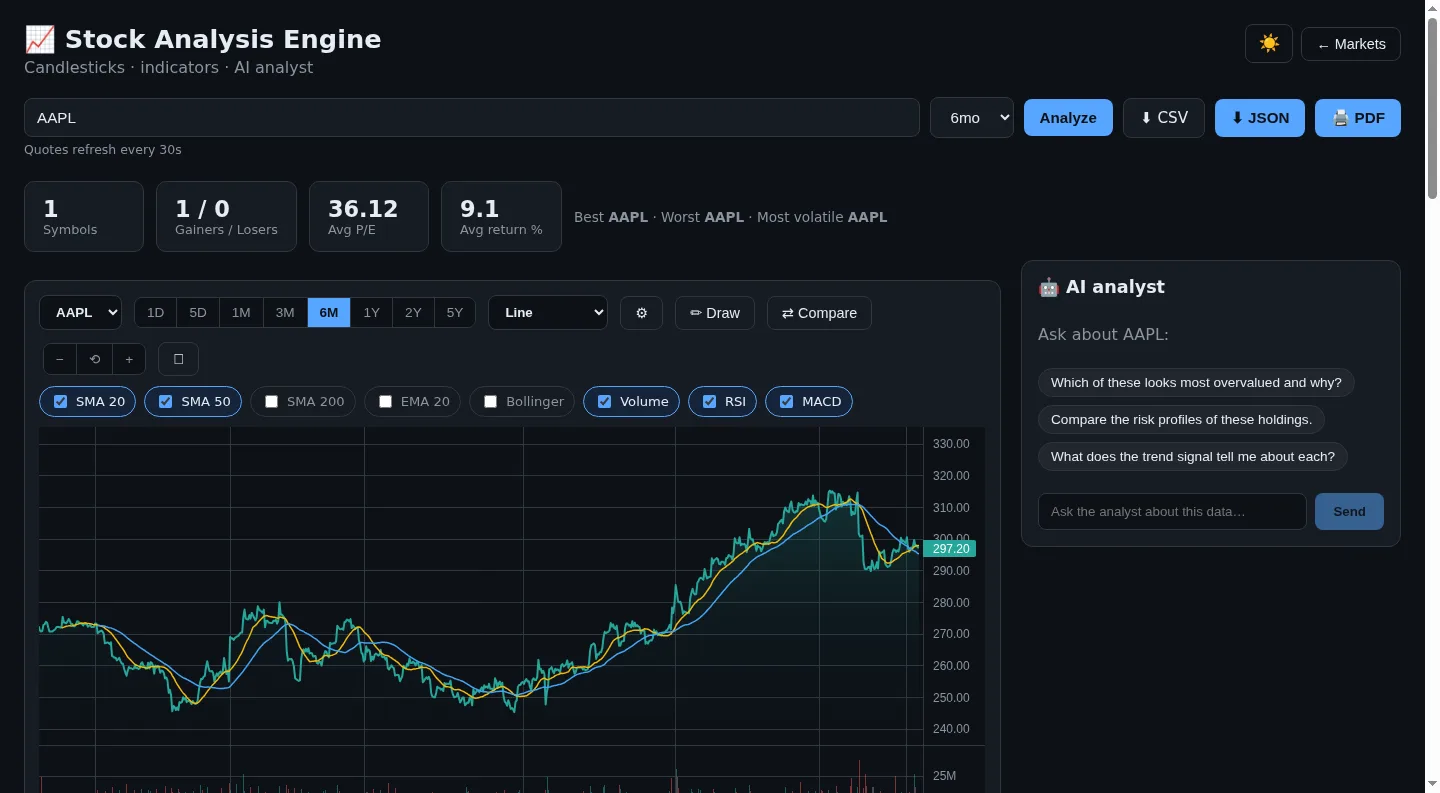
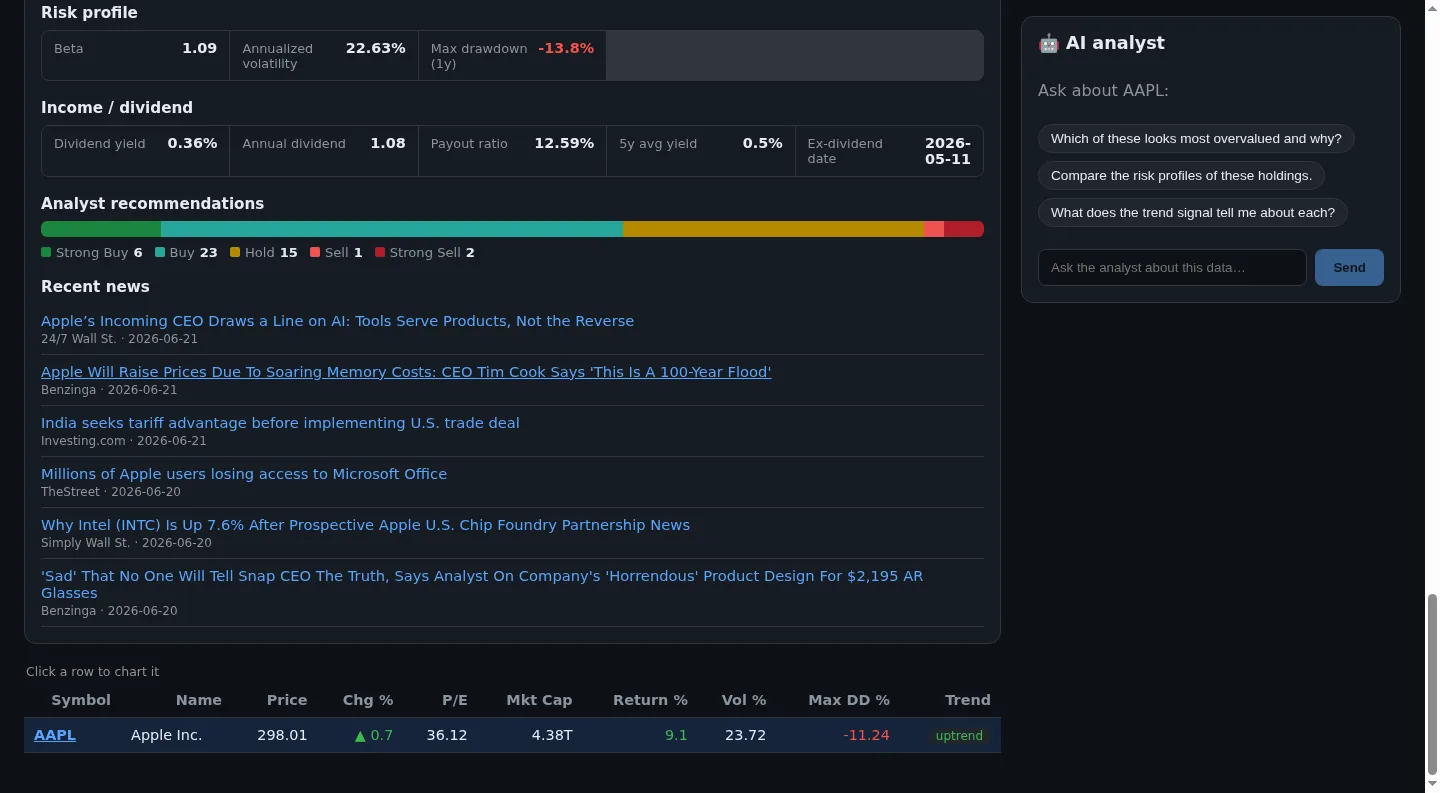
Dev Notes
Problems Solved
Retail stock tools tend to either drown you in noise or hide the math behind a black-box "AI signal." I wanted transparent, deterministic numbers, an AI that explains tradeoffs instead of giving directives, and an analysis path that still runs offline with no keys. That's the disciplined, evidence-first approach to investing my grandfather taught me.
Errors & Fixes
yfinance is unreliable from cloud IPs, so production silently returned empty quotes. I fixed that by making the data layer pluggable and switching the deployed app to a Finnhub REST provider. CORS errors between the React frontend and FastAPI backend disappeared once I deployed both as one same-origin Vercel project (static frontend + a @vercel/python function), with the frontend calling relative /api/....
What I Learned
How to architect shared business logic so two completely different frontends (a React SPA and a Streamlit app) compute identical results from one core/ package. Plus implementing technical indicators from scratch with proper warm-up handling, building a multi-provider AI fallback chain over the OpenAI-compatible wire format, and shipping a hybrid Python + React app on a single Vercel deployment.
What to Inspect Next
Not financial advice. The AI explains tradeoffs, it doesn't give buy/sell calls.
Back to top